


Freelance Secretary: How to Find Clients?
When you launch your business and proudly tell everyone “I’m an entrepreneur”, the very first fear that often arises is the fear of not finding clients.
Finding clients and keeping them loyal is not always easy when you’re just starting out. Many freelancers feel uneasy with commercial outreach and think sales skills are innate. But remember, as a freelance secretary, you work alone and must build your visibility yourself
Develop Your Network
The Rule of the Three Circles
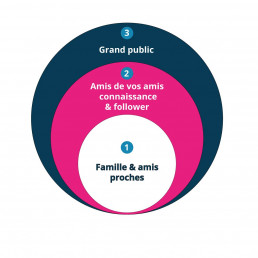
Once your project is launched, your next mission is to make it known as widely as possible. Communication is the key to success. To maximize your chances, apply the “three circles rule”.
Your first circle includes the people closest to you, like family and friends. They are the most reactive, because they know you and want to see you succeed.
Talk to them in person or send them a message. Tell them that if they want to support you, they can share your project on social media or mention it around them.
Grow Your Professional Network
Your second circle is made up of the acquaintances of your first circle, such as friends of your friends and your family’s contacts. These people will discover your activity thanks to word of mouth and social media shares.
Finally, the third circle is the hardest to reach. It includes completely new people and internet users you don’t know. This is when you need to communicate more widely, especially through media, local institutions and the communication channels of your partners. On social media, identify relevant influencers in your niche and send them a short introduction message.
BNI and Professional Events
BNI (Business Network International) is a professional networking group based on mutual referrals. It brings together business owners, freelancers, small businesses and entrepreneurs who want to grow their activities. Participating in BNI can be expensive for someone just starting out, so look for more accessible local networking groups that charge only a small annual fee and organize regular meetups to exchange contacts and recommendations.
Another major event is Go Entrepreneurs (formerly the Salon des Entrepreneurs), the leading business event in Europe. It is ideal to promote your freelance secretary services and meet potential clients.
Coworking Spaces
Coworking spaces are frequented by entrepreneurs, freelancers and small companies who work or hold meetings there. These spaces naturally encourage conversations and connections, giving you an affordable opportunity to network.
Client Recommendations
If you already have satisfied clients, let them know you’re growing your business. A happy client who recommends you has a strong impact on their network. Word of mouth is still one of the most powerful acquisition channels.
Increase Your Visibility
Local Newspapers
A simple article in your local newspaper can make you stand out in your region. It’s perfect if you’re targeting local clients. Many businesses prefer to work with a provider located nearby.
Print Communication
Leave business cards or flyers in strategic locations.
For example
• a popular bakery where artisans and small business owners go for lunch
• office supply stores
• business centers that host small companies
Vehicle signage is another efficient tool. A branded car can be seen by 10,000 to 150,000 people per day depending on your routes and parking spots. Unlike paper ads, your car is visible all day, every day.
Google My Business
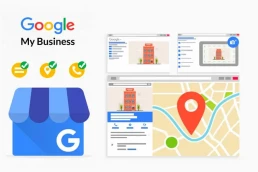
Google My Business helps highlight your business profile and website in Google Search and Maps. It is extremely useful for attracting local clients.
You can add photos and videos of your office or your services to make your business profile more appealing. Think of it as a digital storefront.
Online reviews are essential today. According to a SEO Tribunal study, 86 percent of internet users check online reviews before choosing a product or service.
Local Presence and Social Media
Being active on social media is effective if you use it properly. Take a moment to define your strategy.
Where are your prospects? What do you want to post? Which platforms should you use?
Some platforms are professional (LinkedIn, Viadeo) while others target the general public (Facebook, Instagram, Twitter).

Tips from our Community Manager
-
• Focus on no more than two platforms to stay efficient
• Choose one professional network and one personal one
• Keep your image clean and avoid sharing private life details
• Avoid grammar and spelling mistakes
• Prioritize quality and relevance over quantity
• Use high quality visuals and avoid watermarked images
• Create a professional page distinct from your personal account
Website and Newsletter
Your website must be well structured and responsive (optimized for smartphones and tablets). The platform doesn’t matter (WordPress, Wix, etc.) as long as it meets web standards.
Your professional website should include
• a list of your services
• an “About” page to introduce who you are and what you bring
• clear contact options (phone, email, contact form)
• client reviews and testimonials
• a strong call to action, such as “contact”, “request a quote” or “book an appointment”
If your website is well referenced, clients will come to you. Don’t hesitate to get help from a web or SEO professional.
A newsletter is also an excellent way to build loyalty. It must be sent responsibly and in compliance with GDPR. Share useful content related to your field to maintain your audience’s interest.
In Summary: How a Freelance Secretary Can Find Clients
Start with the “three circles rule”
• Expand through networks like BNI or other business groups
• Attend professional events and fairs
• Use coworking spaces to meet new contacts
• Encourage client recommendations
• Boost your visibility through local media and print communication
• Use Google My Business and social media strategically
• Build a strong website and use newsletters to retain clients

The Best Way to Improve Customer Relationships With a Ticketing Tool
In a world where competition is intense and customers have endless options, businesses must stand out by delivering excellent customer service. Yet managing customer requests efficiently and maintaining a strong relationship can be challenging. Fortunately, ticketing tools help companies improve their customer relations by providing a centralized and organized way to handle support inquiries.
Customer Relationships Matter for Every Business
Customer relationships are essential for every company. Customers are the reason businesses exist, and they can make or break a brand. This is why improving the customer experience should always be a priority.
One of the best ways to strengthen customer relationships is by using a ticketing system. A ticketing solution allows customers to submit tickets whenever they have a problem or a question.

What Is a Ticketing Tool?
A ticketing tool is a software platform used to manage customer requests and incidents. It centralizes all inquiries and enables businesses to track, prioritize and resolve customer issues efficiently.
Each request is assigned a unique ticket number, making it easy to follow throughout the entire resolution process. Employees can collaborate on the same request and keep the customer updated on progress.
By using a ticketing system, companies improve productivity, transparency and their ability to manage customer inquiries. It also increases customer satisfaction by giving them an easy way to submit requests and visibility into how their issue is progressing.
Does Your Business Need a Ticketing Tool?
Today’s customers are more demanding than ever. They expect personalized service and quick resolutions. This is why a ticketing system is essential for improving customer relations.
Here are a few indicators that your business may need one
• You receive a large volume of support requests and struggle to manage them efficiently
• You need to track support inquiries and maintain records for compliance or performance monitoring
• You want to improve communication between departments and streamline problem resolution
• You want to give customers a way to report issues online rather than by phone or email
If you answered “yes” to one or more of these points, your business likely needs a ticketing system.
10 Reasons to Adopt a Ticketing Tool
Regardless of your company size, a ticketing system is always more effective than managing support via email. Online ticket management software saves time and helps maintain a trustful relationship between your brand and customers.
1. Centralization of support requests
All support requests are stored in one place, allowing efficient handling.
2. Detailed ticket tracking
You can follow each request step by step to ensure timely resolution.
3. Efficient communication
Ticketing tools allow communication via email, phone or live chat.
4. Data analysis
Ticketing platforms collect support data, helping you identify recurring issues and find solutions.
5. Task automation
They automate repetitive tasks, such as assigning tickets or updating statuses, saving time and resources.
6. Improved customer satisfaction
Efficient support handling leads to happier customers.
7. Better resource management
Automation and analytics help allocate resources more intelligently.
8. Reporting and statistics
Generate reports and metrics to measure your customer service performance.
9. Integration with other tools
Ticketing systems integrate with CRMs, project management tools, telephony systems and more.
10. Accessibility
Most ticketing tools are online, allowing remote use from any device.
In Summary
A ticketing system is essential for improving customer relationships and managing support requests effectively. Ask yourself the right questions to determine whether your business needs one, and put the right strategies in place to strengthen customer engagement and service quality.

How to Choose the Right Call Center Software in 2023
At the heart of business activity, call centers play a crucial role in customer relations, support and commercial outreach. Choosing the right call center software is essential. What criteria should you consider? Which features are truly essential? What are the benefits of a high-performance platform in terms of productivity and flexibility ? You’ll find all the answers here.
What Is Call Center Software?
More advanced than a standard business telephony solution, call center software is a platform that manages all call-related operations (inbound calls, outbound calls, scheduling, etc.) to optimize your team’s performance.
In a context where flexibility and agility are more important than ever, these tools provide analytics, billing, prospecting and collaboration features that enable a personalized and efficient user experience.
Key Features of Call Center Software
Call center software offers a wide range of features. At Ubicentrex, we listen closely to our clients to develop tools that truly improve daily operations.
Automatic Call Distribution (ACD)
Also known as intelligent call routing, ACD ensures fast and efficient handling of inbound calls. It distributes calls to the appropriate department or the agent best suited to manage the customer’s request.
It can be configured in many ways expanding as your structure grows
• routed to a specific agent or department
• based on opening hours
• based on call volume
• fully customizable
Queue Management
Inbound call volume can spike during peak periods. A queue management tool is essential to smooth traffic and prioritize important calls, helping your teams work more efficiently.
Some systems also include automatic callback, allowing clients who hang up to be contacted at the time they prefer. This ensures you never miss an opportunity.

Interactive Voice Response (IVR)
An IVR, or Interactive Voice Response, is a system that interacts with callers through pre-recorded messages and keypad inputs.
It can
• receive inbound calls
• route users to the right department
• provide information without agent intervention
• announce opening hours or closures
You know that little voice asking you to press 1, 2 or 3? Yes, that one.
IVR is essential when you handle large call volumes and want to save your agents time.
Comprehensive Statistics Tool
A dedicated analytics module allows you to examine every detail of your calls
• relevant call statistics
• team performance metrics
• filtering by agent or call group
• custom reports
A supervision interface gives you a real-time overview of the most important information at a glance.

Internal Messaging
A built-in messaging channel improves information flow across departments or with customers. It may include lightweight file sharing for greater speed and convenience.
Click-to-Call and Predictive Dialing
If you make a high volume of outbound calls, click-to-call is a must. It saves considerable time by automating number dialing.
The predictive dialer automatically calls prospects in advance and only connects agents when someone answers.
This boosts productivity and efficiency for outbound teams.
Remote Sales and Appointment Booking
With a single click, after qualifying a lead, your agents can access the sales team’s calendar and schedule appointments in real time.
Your agenda is available 24/7.
Ubicentrex’s clean interface makes it easy to update caller information and record all relevant details.
Cloud Software or On-Premise?
What’s the difference between cloud and on-premise call center software?
On-Premise Software
Installed physically within your company
Requires hardware investment
Requires manual configuration
Historically the standard for call centers
Cloud Software (SaaS)
Today, thanks to faster internet connections, the cloud model is taking over.
Cloud solutions move your infrastructure and processes from a physical office to a network of servers accessible via the Internet.
Advantages of Cloud Solutions
• Lower installation costs
• Accessible from anywhere for distributed teams
• Ideal for remote work
• No long-term commitment required
• Easy scalability and upgrades
This is why most modern call centers now shift to cloud-based platforms.

When Should a Team Move to Call Center Software?
When we think of call centers, we often imagine huge structures with hundreds of agents. But high-performance software is equally crucial for smaller teams.
If inbound or outbound calls represent a key activity for your business, you should strongly consider adopting a dedicated solution.
For mixed call centers (handling both inbound and outbound calls), you need software that combines
• advanced routing and collaboration features
• productivity enhancers like ACD, click-to-call and predictive dialing
Whether for agent comfort, productivity or improved supervision, the right tool will genuinely transform your organization.

How to Maintain High-Quality Customer Service During the Holiday Season
Although Christmas is traditionally a time of joy, the celebration has become highly commercial. For many businesses, it is the period of the year with the highest sales. And where there are sales, there is after-sales service. Which means: customer support.
Prepare Your Contact Center Ahead of Time
Analyze the statistics from previous years
Your call center software includes a statistics module that can save you time and headaches. Review historical data from previous years to identify peaks and dips, then adjust staffing accordingly.
This period is one of the worst to be understaffed.
Key metrics to monitor
• inbound call volume
• average handling time
• average response time
Start by being as clear as possible about business hours and opening days using a pre-answer message, to avoid frustrating customers.
The final step is to create call scripts to support agents and guide their conversations during high-volume periods. Give them some comfort during this busy season.

60 percent of customers will not return after just one bad experience.
Automating Customer Service
Good preparation starts with anticipating customer needs.
By analyzing which products generate the most after-sales inquiries, you can configure a chatbot with the most frequent questions, reducing inbound call volume.
Next, pair it with live chat, giving customers the option to dig deeper into topics not covered in the chatbot.
Finally, create clear support documents addressing recurring issues, so customers find answers quickly.
48 percent of consumers end a chat session if their issue is not resolved within five minutes.
Key Features That Reduce Wait Times
Thanks to good anticipation, you’ve reduced the number of calls and resolved many issues already. Great.
But you won’t be able to handle everything this way. That’s where your queue management system becomes essential to minimize missed calls.
Consumers expect less than one minute of waiting time when calling customer service. Here’s how to optimize your queue.
The Ubicentrex solution includes features specifically designed for peak periods.
Call centers can enhance inbound call processing by combining a well-designed IVR (Interactive Voice Response) with ACD (Automatic Call Distribution).
ACD uses predefined routing rules based on agent skills, ensuring customers reach the most qualified advisor as quickly as possible.
- Encourage callers to leave a detailed message explaining their issue and call them back as soon as possible. This saves them from waiting in the queue.
It’s crucial to have a system that allows customers to schedule a callback at the time of their choice.
The Advantage of a SaaS Solution: Harnessing the Cloud
IP telephony, or VoIP, increases the efficiency of your customer service during peak periods.
It adapts in real time to your business needs.
If you exceed your expected call volume and need additional agents, you can deploy them instantly and allow them to work remotely, without disrupting your operations.
The Holiday Season: A Human Opportunity You Shouldn’t Miss
Bring holiday spirit into your call center
At this time of year, shops, streets and homes are decorated with lights and music.
Don’t let your call center feel dull and grey.
Decorate with a Christmas tree and festive ornaments to brighten the workspace.
Another source of motivation: treats.
Chocolates and holiday snacks are inexpensive and show employees that you appreciate them.
You can also give personalized holiday cards to your team, just as suppliers send cards to clients.
Avoid generic printed messages. Write a personal note for each agent.

“The happier your employees, the more satisfied your customers will be.”
“Take care of your employees and they will take care of your business.”
Improving Your Call Center’s Customer Relationship
Customer relations, just like society as a whole, have undergone major changes in recent years. Difficult economic conditions, more demanding clients and increased anxiety all contribute to reshaping the way companies approach customer relationship management.
What Is Customer Relationship Management?
Customer relationship refers to the communication methods used by a company to maintain a privileged connection with its clients.
The channels involved are vast, including:
prospecting, call handling, after-sales service, digital communication, social media, and more.
Maintaining and Improving Customer Relationships
Be responsive and efficient
68 percent of customers who switch providers do so because they were not satisfied with the way they were treated. This shows just how crucial customer relationship quality is to the long-term success of a business.
A complaining customer is a customer who still values your service.
A disappointed customer, however, will leave.
A client who expresses dissatisfaction is giving you a chance to improve.
Resolving the problem of an unhappy customer fosters loyalty and strengthens their trust in your company.
Give clients the choice of communication channel
Changes in buying behavior and the digitalization of services require businesses to adapt their customer relations strategy.
Offering multiple communication channels is essential.
However, you must ensure your messaging is consistent across all these channels.
A message that varies depending on the channel can harm customer trust.
Imagine receiving an offer by email that does not match what appears on the website or in-store.
By developing multiple communication channels, you allow customers to contact you in the way that suits them best.
Some prefer speaking with an agent by phone, others prefer email for a written trace, and many appreciate fast responses via social media.
Physical mail may seem outdated, but in some communication campaigns it is perceived as a thoughtful and personalized touch.
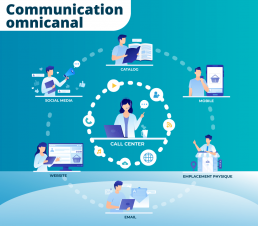
An omnichannel strategy helps you gain customers, improve satisfaction and loyalty and build a competitive advantage.
The Impact of Telephony on Customer Relationships
As seen earlier, there are many contact methods, so why does the telephone remain so important?
A human touch
The presence of a human voice is more reassuring and personal than an automated message or online form.
A voice also conveys emotion, which is a key element of customer relationships.
A universal method
Regardless of your customers’ age, everyone knows how to make a phone call.
Since 2016, mobile connections have surpassed desktop connections.
Many clients now contact you from their mobile phones.
Higher-quality interactions
Phone calls allow customers to explain their issues in detail, even in complex cases.
Improving Customer Satisfaction
Using VOIP not only reduces costs but also allows teams to work from anywhere.
Remote work and professional mobility are major trends, and happier employees mean better interactions on the phone.
Advanced telephony features like IVR (Interactive Voice Response) or CRM screen-pop (caller information displayed automatically) also improve satisfaction.
A well-designed IVR helps customers solve simple issues or reach the right agent immediately.
However, if your IVR is too complex, too long or unpleasant to listen to, it will harm your brand image.
Key Performance Indicators for Your Customer Service
There are many indicators you can use to evaluate customer satisfaction. Whether qualitative or quantitative, they are essential for measuring call center performance.
Average handling time (AHT)
The total time an agent spends on a customer case, including conversation time, hold time, and post-call tasks.
Average waiting time
Also called Average Speed of Answer (ASA), it measures how long incoming calls stay in the queue before being handled.
Customer Effort Score (CES)
Measures how easy it is for a customer to interact with your company, for example to resolve a problem.
Throughout the customer journey, every action requires a certain level of effort.
CES reveals the ease and quality of these interactions, which directly impacts experience and loyalty.
Call data also allows you to analyze the number of positive interactions compared to total incoming calls.
Such tools give supervisors a clear picture of service quality, which directly influences customer relationships.